How to do linear, exponential, power, polynomial, sine and logistic regression on a Casio ClassWiz or fx-CG50
On the fx-991EX: MENU → 6 (Statistics).On the fx-991CW: HOME → Statistics → 2-Variable.
Least-squares lines and curves: linear, exponential, power, quadratic, cubic, sinusoidal and logistic models. Exact keystrokes for the Casio ClassWiz first (the fx-991EX and fx-991CW have different menus, so each has its own tab), then the graphic calculators, a worked example you can check your answers against, the mistakes that cost marks, and the same thing in Desmos.
When you need it
A Level uses the regression line (y on x) in the large data set questions and in IAL S1, and logarithms to turn y = axⁿ and y = abˣ into straight lines. The calculator's power and exponential regressions check that work.
Practise it: Statistical sampling and data · Exponentials and logarithms · IAL S1.
Keystrokes on your calculator
Pick your calculator: the page remembers it next time.
Regression on the Casio fx-991EX ClassWiz
Written for the fixed ROM (these models take no OS updates). Casio fx-991EX ClassWiz: scientific (no graphs).

Watch the key presses on the fx-991EX9 presses, one at a time
The walkthrough needs JavaScript. The same key presses are in the numbered steps below.
- MENU 6 (Statistics), then the model: 2 y = a + bx (others: y = a + bx + cx², y = a + b·ln x, y = a·e^(bx), y = a·bˣ, y = a·xᵇ, y = a + b/x).
- Type the x values in column x and the y values in column y (= after each).
- OPTN → Regression Calc: shows a, b and r.
- Predict: AC, then 7.5 OPTN → Regression → ŷ, =.
- No sine, cubic or logistic regression on the ClassWiz.
- Note the order: y = a + bx, so a is the intercept here (the fx-CG50's ax+b uses a for the gradient).
Regression on the Casio fx-991CW ClassWiz
Written for the fixed ROM (these models take no OS updates). Casio fx-991CW ClassWiz: scientific (no graphs); the newer ClassWiz with a HOME menu of apps.

- HOME → Statistics → 2-Variable.
- Type the data in the x and y columns.
- Press OK, choose Reg Results and then the model, e.g. y=a+bx: a, b and r.
- Same models and a/b naming as the fx-991EX; no sine, cubic or logistic.
Regression on the Casio fx-CG50
Written for OS 3.80 (menus unchanged from OS 3.60 onwards as far as we can tell). Casio fx-CG50: graphic (GDC).
Watch the key presses on the fx-CG5015 presses, one at a time
The walkthrough needs JavaScript. The same key presses are in the numbered steps below.
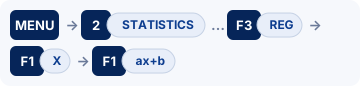
- MENU 2 (STATISTICS). Type the x values into List 1 and the y values into List 2, pressing EXE after each. (Clear an old list first: highlight the list, F6 (▷) F4 (DELETE-ALL) F1 (Yes).)
- F2 (CALC) F6 (SET): 2Var XList = List1, 2Var YList = List2, 2Var Freq = 1. EXIT.
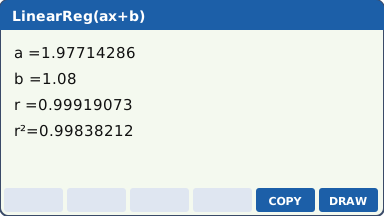
- F3 (REG) F1 (X) F1 (ax+b). The screen shows a, b, r, r² and MSe.
- Other models from the REG menu: F3 (X²) quadratic, F4 (X³) cubic; F6 (▷) then F1 (Log), F2 (Exp: F1 ae^bx or F2 ab^x), F3 (Pwr) axᵇ, F4 (Sin), F5 (Lgst) logistic.
- F5 (COPY) pastes the equation into the GRAPH Y= list; F6 (DRAW) plots it over the scatter diagram.
- Sin regression: set SHIFT MENU (SET UP) → Angle = Rad first. The model is y = a·sin(bx + c) + d.
- Logistic: y = c ÷ (1 + a·e^(−bx)). IB writes it L ÷ (1 + Ce^(−kx)), so L = c, C = a, k = b.
- Quadratic, cubic and the curve models show R² (the coefficient of determination), not r.
- Predict from the stored model: in RUN-MATRIX use OPTN F5 (STAT) → ŷ (7.5 F2 ŷ in linear mode).
Regression on the TI-84 Plus CE
Written for OS 5.8.x. TI-84 Plus CE: graphic (GDC); also the TI-84 Plus CE Python / CE-T Python Edition.

Watch the key presses on the TI-84 Plus CE15 presses, one at a time
The walkthrough needs JavaScript. The same key presses are in the numbered steps below.
- stat 1: Edit. Clear old data: move onto the L1 heading, clear, enter. Type the x values in L1 and the y values in L2.
- Turn diagnostics on once: mode → STAT DIAGNOSTICS: ON (on older OS versions: 2nd 0 (CATALOG) → DiagnosticOn → enter enter). Without it r and r² are not shown.
- stat → CALC → 4: LinReg(ax+b). Xlist: L1, Ylist: L2, Store RegEQ: Y1 (alpha trace → Y1). Calculate.
- Other models in the same CALC list: 5: QuadReg, 6: CubicReg, 9: LnReg, 0: ExpReg (y = a·bˣ), A: PwrReg, B: Logistic, C: SinReg.
- SinReg gives y = a·sin(bx + c) + d and works in radians.
- Logistic gives y = c ÷ (1 + a·e^(−bx)).
- Storing to Y1 lets you predict with Y1(7.5) on the home screen.
Regression on the TI-Nspire CX II
Written for OS 6.x. TI-Nspire CX II: graphic (GDC), non-CAS (the CX II CAS is a different model: check the exam rules before using one).
- Add a Lists & Spreadsheet page (ctrl doc → Add Lists & Spreadsheet). Name column A xs and column B ys in the top row, then type the data.
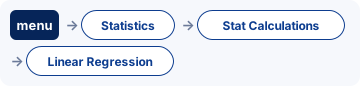
- menu → Statistics → Stat Calculations → Linear Regression (mx+b). X List: xs, Y List: ys, Save RegEqn to: f1. OK.
- The results (m, b, r², r) appear in the next empty columns.
- Other models in the same menu: Quadratic, Cubic, Power, Exponential (y = a·bˣ), Logarithmic, Sinusoidal, Logistic (d = 0).
- Predict with f1(7.5) on a Calculator page.
- Logistic (d = 0) is y = c ÷ (1 + a·e^(−bx)).
For teachers: Show on the board Print a keystroke card Teaching GDC skills
Worked example
(a) x = 1, 2, 3, 4, 5, 6; y = 3.1, 4.9, 7.2, 8.8, 11.1, 12.9. Find the regression line of y on x, r, and predict y when x = 7.5. (b) Same x, y = 2.0, 3.1, 4.4, 6.6, 9.8, 14.5. Fit y = a·bˣ and predict y at x = 8.
Answers (checked with Python)
(a) y = 1.97714x + 1.08, r = 0.999191; at x = 7.5, y ≈ 15.9. (b) y = 1.37065 × 1.48177ˣ (equivalently y = 1.37065e0.393240x); at x = 8, y ≈ 31.9 (an extrapolation, so less reliable).
Now try it on an exam-style question
Use the keystrokes above on A Level-style sampling and data questions. Free to try, no sign-up.
Common calculator mistakes
- Mixing up a and b: fx-CG50 ax+b and TI LinReg(ax+b) use a for the gradient; the ClassWiz and TI LinReg(a+bx) use b for the gradient.
- Leaving old data in the lists (or a frequency list set to List 3 from a previous question).
- Regression of x on y when the question wants y on x: the x values go in the first list.
- Quoting r for a non-linear model: for quadratics and curves use R².
- Sine regression in degree mode gives nonsense coefficients.
- Predicting far outside the data range (extrapolation) without saying it may be unreliable.
If you get an error
fx-991EX: Math ERROR, Syntax ERROR
Math ERROR A result, or a value you typed, is outside the range the calculator can handle, or you asked for something mathematically impossible, such as dividing by zero. Check: Look for a zero denominator, sin⁻¹ or cos⁻¹ of a number bigger than 1 (often a wrong side or angle in the sine or cosine rule), the log of 0 or of a negative number, and a value stored in a variable earlier that you forgot about. Fix: Casio's advice: check the values you typed, use fewer digits and try again. If a variable is the input to a function, make sure its value is one the function accepts.
Syntax ERROR There is a problem with the format of the calculation. In Matrix and Vector calculations it also appears when the sizes do not suit the operation. Check: A missing or extra bracket, or two operation signs in a row. With matrices or vectors: adding a 2 × 2 to a 3 × 3, or a product whose sizes do not match. Fix: Casio's advice: make the corrections. For matrices and vectors, check the size you set for each one.
fx-991CW: Math ERROR, Syntax ERROR
Math ERROR A result, or a value you typed, is outside the range the calculator can handle, or you asked for something mathematically impossible, such as dividing by zero. Check: Look for a zero denominator, sin⁻¹ or cos⁻¹ of a number bigger than 1 (often a wrong side or angle in the sine or cosine rule), the log of 0 or of a negative number, and a value stored in a variable earlier that you forgot about. Fix: Casio's advice: check the values you typed, use fewer digits and try again. If a variable is the input to a function, make sure its value is one the function accepts.
Syntax ERROR There is a problem with the format of the calculation: it is typed in a form the calculator cannot read. Check: A missing or extra bracket, two operation signs in a row, or a function with nothing after it. Fix: Casio's advice: make the corrections and try again.
fx-CG50: Ma ERROR
Ma ERROR Casio's Math ERROR: the result is outside the allowable calculation range, or you are trying to do an illegal mathematical operation, such as dividing by zero. Check: Look for a zero denominator, sin⁻¹ or cos⁻¹ of a number bigger than 1 (often a wrong side or angle in the sine or cosine rule), the log of 0 or of a negative number, and a value stored in a variable earlier that you forgot about. Fix: Casio's advice: check your input values and change them so the result is within the allowable range.
TI-84 Plus CE: ERR:DOMAIN, ERR:DIM MISMATCH, ERR:INVALID DIM, ERR:SYNTAX, ERR:STAT
ERR:DOMAIN A value given to a function or instruction is outside the values it accepts. In a regression, TI says it means the data do not suit the model you chose. Check: Is every input allowed? σ must be positive, p between 0 and 1, and sin⁻¹ or cos⁻¹ needs a number from −1 to 1. Exponential and power models need positive data. Fix: Change the value that is out of range, or choose a model that suits the data.
ERR:DIM MISMATCH Lists or matrices in the same operation have different sizes (TI's example: multiplying two lists with different numbers of elements). Check: L1 and L2 with different numbers of values (one value missed or typed twice), a frequency list of the wrong length, or matrices whose sizes cannot be multiplied. Fix: Make the lists the same length, or check the size of each matrix.
ERR:INVALID DIM TI's knowledge base: one or more stat plots are turned on, but the lists they use are empty. Check: A stat plot left on from a statistics question, so the error appears when you graph a function. Fix: Turn off the stat plots you are not using, or put the data back in the lists.
ERR:SYNTAX The command contains a syntax error: a misplaced function, argument, bracket or comma. Check: TI points out that subtract − and negative (−) are different keys, and using the wrong one causes this error. Then check the brackets and commas. Fix: Find the misplaced function, argument, bracket or comma and correct it.
ERR:STAT A statistics calculation was tried on lists that are not suitable. A statistical analysis needs at least two data points. Check: An empty or one-value list, or the wrong list named in the command. Fix: Check the lists named in the command and the data in them.
TI-Nspire CX II: Domain error, Dimension mismatch, Syntax error
Domain error An argument must be in a specified domain, and this one is not (TI's example: rand(0)). Check: Is every input allowed? σ must be positive, p between 0 and 1, and sin⁻¹ or cos⁻¹ needs a number from −1 to 1. Fix: Change the value that is out of range.
Dimension mismatch Two or more arguments must have the same dimension and do not (TI's example: [1,2]+[1,2,3]). Check: Lists of different lengths in a statistics command, or vectors or matrices of different sizes. Fix: Make the lists, vectors or matrices the sizes the operation needs.
Syntax error The syntax checker found a problem. Check: A missing bracket or comma. Fix: Correct the expression and try again.
Do it in Desmos
Not in the exam. Desmos is not allowed in A Level exams. Use it to learn, to check a calculator answer, and to see what a function or data set looks like.
- Add a table (+ → table) with the data in x₁ and y₁.
- Type y₁ ~ m x₁ + b. Desmos shows m, b, r and R² and draws the line.
- For an exponential model type y₁ ~ a b^{x₁}. Desmos fits the curve directly; your GDC fits a straight line to ln y. Turn on "log mode" in the regression's options to get the GDC's answer.
- Sinusoidal and logistic work the same way: y₁ ~ a sin(b x₁ + c) + d, y₁ ~ L/(1 + C e^{−k x₁}).
Open desmos.com/calculator (free, in any browser) and type:
table: x_1 = 1, 2, 3, 4, 5, 6; y_1 = 3.1, 4.9, 7.2, 8.8, 11.1, 12.9y_{1}~ mx_{1}+b
Questions
Can I use a calculator for regression in the exam?
Yes. Every UK A Level Maths paper (Edexcel 9MA0, AQA 7357, OCR H240) and every Edexcel IAL unit, P1 included, allows a calculator that has no CAS and no wireless link. The fx-CG50 qualifies.
What are the fx-991EX keystrokes for regression?
MENU 6 (Statistics), then the model: 2 y = a + bx (others: y = a + bx + cx², y = a + b·ln x, y = a·e^(bx), y = a·bˣ, y = a·xᵇ, y = a + b/x). Then Type the x values in column x and the y values in column y (= after each). Then OPTN → Regression Calc: shows a, b and r. The full steps and the other calculators are in the keystrokes section above.
Does this work on other calculators?
Yes. This page has keystrokes for the Casio fx-991EX ClassWiz, Casio fx-991CW ClassWiz, Casio fx-CG50, TI-84 Plus CE and TI-Nspire CX II. The worked example has the same answers on every model, so use it to check.
What should I write as working?
Write the maths, not the key presses: say what you are finding in normal notation (the equation, the probability statement or the integral), then the calculator's answer to the accuracy the question asks for (often 3 significant figures). Keep full accuracy in later parts.
More calculator skills
Sources
- Casio fx-991EX / fx-570EX Quick Start Guides : Casio fx-991EX ClassWiz, the fixed ROM (these models take no OS updates).
- Casio fx-991CW / fx-570CW User's Guide : Casio fx-991CW ClassWiz, the fixed ROM (these models take no OS updates).
- Casio fx-CG50 Software User's Guide, OS 3.70 (PDF) : Casio fx-CG50, OS 3.80 (menus unchanged from OS 3.60 onwards as far as we can tell).
- TI-84 Plus CE guidebook (Texas Instruments) : TI-84 Plus CE, OS 5.8.x.
- TI-Nspire CX II guidebooks (Texas Instruments) : TI-Nspire CX II, OS 6.x.
- Desmos Help Center for the Desmos functions.
Menu names are taken from each manufacturer's manual for the models shown. Menus can move slightly between OS updates: if a screen looks different on yours, the manual for your version is the reference, and please tell us so we can update this page. A calculator with no tab here has no checked steps for this skill yet. Worked-example answers were recomputed independently in Python.