How to do complex numbers (modulus, argument, polar form) on a Casio ClassWiz or fx-CG50
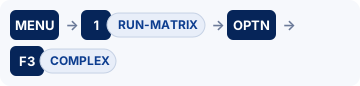
On the fx-991EX: MENU → 2 (Complex).On the fx-CG50: MENU → 1 (RUN-MATRIX) → OPTN → F3 (COMPLEX).
Arithmetic with i, the modulus and argument, and converting between Cartesian and polar/exponential form. Exact keystrokes for the Casio ClassWiz first (the fx-991EX and fx-991CW have different menus, so each has its own tab), then the graphic calculators, a worked example you can check your answers against, the mistakes that cost marks, and the same thing in Desmos.
When you need it
Further Maths (Core Pure): arithmetic, modulus–argument form, loci and roots of polynomials. Use the calculator to check exact answers.
Practise it: Algebra and functions.
Keystrokes on your calculator
Pick your calculator: the page remembers it next time.
Complex numbers on the Casio fx-991EX ClassWiz
Written for the fixed ROM (these models take no OS updates). Casio fx-991EX ClassWiz: scientific (no graphs).

Watch the key presses on the fx-991EX9 presses, one at a time
The walkthrough needs JavaScript. The same key presses are in the numbered steps below.
- MENU 2 (Complex).
- Type (3 + 4i) ÷ (1 − 2i): in Complex mode ENG types i. =.
- |z|: SHIFT ( (Abs). Argument (OPTN 1), conjugate and ▶r∠θ are in OPTN.
- Set the angle unit to radians in SETUP for the argument in radians.
Complex numbers on the Casio fx-CG50
Written for OS 3.80 (menus unchanged from OS 3.60 onwards as far as we can tell). Casio fx-CG50: graphic (GDC).
Watch the key presses on the fx-CG5016 presses, one at a time
The walkthrough needs JavaScript. The same key presses are in the numbered steps below.
- SHIFT MENU (SET UP): Complex Mode = a+bi, Angle = Rad. EXIT.
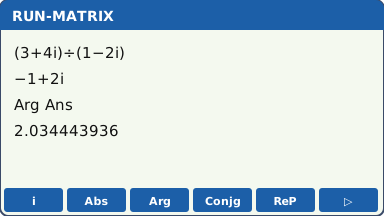
- MENU 1 (RUN-MATRIX). Type (3 + 4i) ÷ (1 − 2i) where i is SHIFT 0. EXE gives −1 + 2i.
- OPTN F3 (COMPLEX): F2 (Abs) for |z|, F3 (Arg) for arg z, F4 (Conjg) for z*. Use Ans for the last answer.
- Polar form: F6 (▷) → ▶r∠θ after the number; ▶a+bi converts back.
- In Real mode (the default) a complex answer gives Non-Real ERROR: switch to a+bi.
Complex numbers on the TI-84 Plus CE
Written for OS 5.8.x. TI-84 Plus CE: graphic (GDC); also the TI-84 Plus CE Python / CE-T Python Edition.

Watch the key presses on the TI-84 Plus CE6 presses, one at a time
The walkthrough needs JavaScript. The same key presses are in the numbered steps below.
- mode → a+bi, RADIAN.
- Type (3 + 4i) / (1 − 2i); i is 2nd ..
- math → CMPLX: abs(, angle(, conj(, real(, imag(, ►Polar, ►Rect.
Complex numbers on the TI-Nspire CX II
Written for OS 6.x. TI-Nspire CX II: graphic (GDC), non-CAS (the CX II CAS is a different model: check the exam rules before using one).
- Settings (home/on → Settings → Document Settings): Real or Complex = Rectangular, Angle = Radian.
- Type (3+4i)/(1−2i) with i from the π▸ key. enter.
- abs(ans), angle(ans), conj(ans) (menu → Number → Complex Number Tools). ▶Polar converts to polar form.
For teachers: Show on the board Print a keystroke card Teaching GDC skills
Quick answers
How do I type i (imaginary numbers) on the fx-991EX?
MENU 2 (Complex). Type (3 + 4i) ÷ (1 − 2i): in Complex mode ENG types i. =.
How do I type i (imaginary numbers) on the fx-CG50?
MENU 1 (RUN-MATRIX). Type (3 + 4i) ÷ (1 − 2i) where i is SHIFT 0. EXE gives −1 + 2i.
How do I type i (imaginary numbers) on the TI-84 Plus CE?
Type (3 + 4i) / (1 − 2i); i is 2nd ..
How do I type i (imaginary numbers) on the TI-Nspire CX II?
Type (3+4i)/(1−2i) with i from the π▸ key. enter.
Worked example
z = (3 + 4i) ÷ (1 − 2i). Find z in the form a + bi, |z| and arg z.
Answers (checked with Python)
z = −1 + 2i, |z| = √5 = 2.23607, arg z = 2.03444 radians (116.565°).
Common calculator mistakes
- Argument in degrees when the question wants radians (or the other way round).
- The argument is in (−π, π]: a question asking for 0 ≤ θ < 2π needs 2π added to negative values.
- Missing brackets: 3 + 4i ÷ 1 − 2i is not (3 + 4i) ÷ (1 − 2i).
- Real mode: Non-Real ERROR or Math ERROR instead of a complex answer.
If you get an error
fx-991EX: Math ERROR, Syntax ERROR
Math ERROR A result, or a value you typed, is outside the range the calculator can handle, or you asked for something mathematically impossible, such as dividing by zero. Check: Look for a zero denominator, sin⁻¹ or cos⁻¹ of a number bigger than 1 (often a wrong side or angle in the sine or cosine rule), the log of 0 or of a negative number, and a value stored in a variable earlier that you forgot about. Fix: Casio's advice: check the values you typed, use fewer digits and try again. If a variable is the input to a function, make sure its value is one the function accepts.
Syntax ERROR There is a problem with the format of the calculation. In Matrix and Vector calculations it also appears when the sizes do not suit the operation. Check: A missing or extra bracket, or two operation signs in a row. With matrices or vectors: adding a 2 × 2 to a 3 × 3, or a product whose sizes do not match. Fix: Casio's advice: make the corrections. For matrices and vectors, check the size you set for each one.
fx-CG50: Ma ERROR
Ma ERROR Casio's Math ERROR: the result is outside the allowable calculation range, or you are trying to do an illegal mathematical operation, such as dividing by zero. Check: Look for a zero denominator, sin⁻¹ or cos⁻¹ of a number bigger than 1 (often a wrong side or angle in the sine or cosine rule), the log of 0 or of a negative number, and a value stored in a variable earlier that you forgot about. Fix: Casio's advice: check your input values and change them so the result is within the allowable range.
TI-84 Plus CE: ERR:DOMAIN, ERR:SYNTAX, NONREAL ANSWERS, ERR:DATA TYPE
ERR:DOMAIN A value given to a function or instruction is outside the values it accepts. In a regression, TI says it means the data do not suit the model you chose. Check: Is every input allowed? σ must be positive, p between 0 and 1, and sin⁻¹ or cos⁻¹ needs a number from −1 to 1. Exponential and power models need positive data. Fix: Change the value that is out of range, or choose a model that suits the data.
ERR:SYNTAX The command contains a syntax error: a misplaced function, argument, bracket or comma. Check: TI points out that subtract − and negative (−) are different keys, and using the wrong one causes this error. Then check the brackets and commas. Fix: Find the misplaced function, argument, bracket or comma and correct it.
NONREAL ANSWERS In Real mode, the calculation gave a complex result. Check: The square root of a negative number, or an equation with no real solution. Fix: If a complex answer is expected, switch the mode to a+bi; otherwise check the inputs.
ERR:DATA TYPE An argument is the wrong type, such as a complex number where a real number is needed, or a matrix stored to a list. Check: A complex result used in a real-only command, or a list and a matrix mixed up. Fix: Use the type the command expects.
TI-Nspire CX II: Domain error, Syntax error
Domain error An argument must be in a specified domain, and this one is not (TI's example: rand(0)). Check: Is every input allowed? σ must be positive, p between 0 and 1, and sin⁻¹ or cos⁻¹ needs a number from −1 to 1. Fix: Change the value that is out of range.
Syntax error The syntax checker found a problem. Check: A missing bracket or comma. Fix: Correct the expression and try again.
Do it in Desmos
Not in the exam. Desmos is not allowed in A Level exams. Use it to learn, to check a calculator answer, and to see what a function or data set looks like.
- Type z = (3 + 4i)/(1 − 2i). Desmos switches to complex mode and plots z as a point on the Argand diagram.
- |z| and arg(z) give the modulus and argument (in radians).
Open desmos.com/calculator (free, in any browser) and type:
z=frac{3+4i}{1-2i}|z|arg(z)
Questions
Can I use a calculator for complex numbers in the exam?
Yes. Every UK A Level Maths paper (Edexcel 9MA0, AQA 7357, OCR H240) and every Edexcel IAL unit, P1 included, allows a calculator that has no CAS and no wireless link. The fx-CG50 qualifies.
What are the fx-991EX keystrokes for complex numbers?
MENU 2 (Complex). Then Type (3 + 4i) ÷ (1 − 2i): in Complex mode ENG types i. =. Then |z|: SHIFT ( (Abs). Argument (OPTN 1), conjugate and ▶r∠θ are in OPTN. The full steps and the other calculators are in the keystrokes section above.
Does this work on other calculators?
Yes. This page has keystrokes for the Casio fx-991EX ClassWiz, Casio fx-CG50, TI-84 Plus CE and TI-Nspire CX II. The worked example has the same answers on every model, so use it to check.
What should I write as working?
Write the maths, not the key presses: say what you are finding in normal notation (the equation, the probability statement or the integral), then the calculator's answer to the accuracy the question asks for (often 3 significant figures). Keep full accuracy in later parts.
How do I type i (imaginary numbers) on the fx-991EX?
MENU 2 (Complex). Type (3 + 4i) ÷ (1 − 2i): in Complex mode ENG types i. =.
How do I type i (imaginary numbers) on the fx-CG50?
MENU 1 (RUN-MATRIX). Type (3 + 4i) ÷ (1 − 2i) where i is SHIFT 0. EXE gives −1 + 2i.
How do I type i (imaginary numbers) on the TI-84 Plus CE?
Type (3 + 4i) / (1 − 2i); i is 2nd ..
How do I type i (imaginary numbers) on the TI-Nspire CX II?
Type (3+4i)/(1−2i) with i from the π▸ key. enter.
More calculator skills
Sources
- Casio fx-991EX / fx-570EX Quick Start Guides : Casio fx-991EX ClassWiz, the fixed ROM (these models take no OS updates).
- Casio fx-CG50 Software User's Guide, OS 3.70 (PDF) : Casio fx-CG50, OS 3.80 (menus unchanged from OS 3.60 onwards as far as we can tell).
- TI-84 Plus CE guidebook (Texas Instruments) : TI-84 Plus CE, OS 5.8.x.
- TI-Nspire CX II guidebooks (Texas Instruments) : TI-Nspire CX II, OS 6.x.
- Desmos Help Center for the Desmos functions.
Menu names are taken from each manufacturer's manual for the models shown. Menus can move slightly between OS updates: if a screen looks different on yours, the manual for your version is the reference, and please tell us so we can update this page. A calculator with no tab here has no checked steps for this skill yet. Worked-example answers were recomputed independently in Python.